Setup SSO for Azure Active Directoy
Prerequisites
- Must provision users in both Tableau and Azure Active Directory
- Tableau version 21.4 or later
- SSO over SAML for Tableau with AAD as IdP
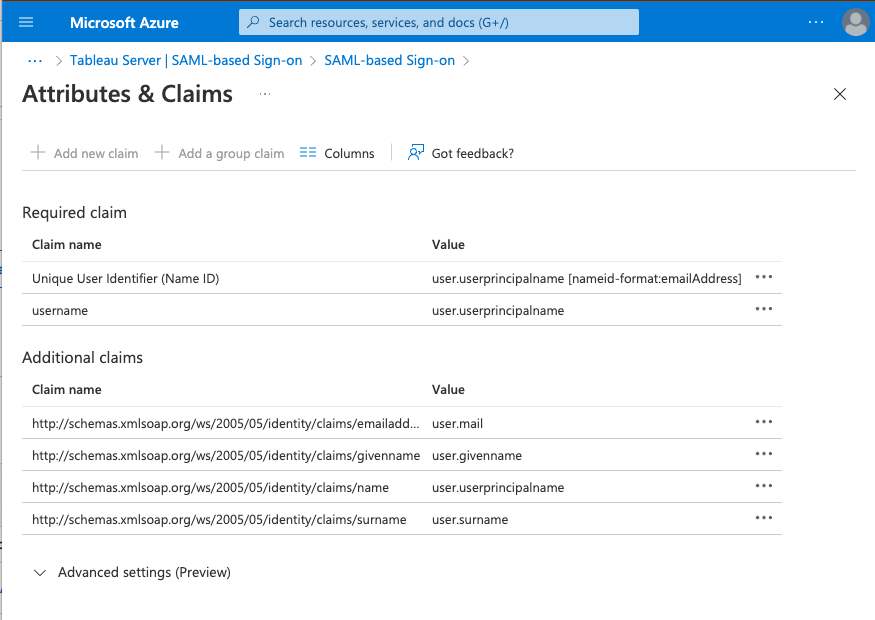
Setup AAD as IDP for Tableau
Tutorial: Microsoft Entra single sign-on (SSO) integration with Tableau Server - Microsoft Entra ID
Entity ID: saml-metadata-entityid - InCommon Federation - Internet2 Wiki
Add two Reply URLs (Assertion Consumer Service URL).
- One for the Rapid Portal. Eg;
- Two for the Tableau Server. Eg;
Sign on URL: Your Tableau Server URL. Eg; https://tableau-saml.zuarbase.net
Replay State: Empty
Logout URL: Empty
Setup Tableau to use AAD as IDP
Tableau Server return URL: The URL of the Tableau Server. Eg; https://tableau-saml.zuarbase.net
SAML entity ID: Same value as entered in AAD entity ID
SAML certificate/key files: Generate using openssl req -x509 -sha256 -nodes -days 365 -newkey rsa:2048 -keyout saml.key -out saml.crt
Setup Rapid Portal / ZWAF to use SAML
This assumes running locally from zwaf repo home dir.
Add volume to auth in docker-compose.yaml
- ./app/saml:/app/saml
In zuar.conf, update the 401 redirect to the following:
location @401 {
    return 302 https://$http_host/saml?url=https://$http_host$request_uri;
}
Add zwaf/nginx/conf.d/saml.conf
server {
    listen 443 ssl;
    server_name _;
    root /app/static/;
    resolver 127.0.0.11;
    ssl_certificate /etc/ssl/snakeoil.crt;
    ssl_certificate_key /etc/ssl/snakeoil.key;
    location = /saml {
        proxy_pass http://auth:5756$request_uri;
        include cors_params;
        include nocache_params;
    }
}
Add settings.json
{
    "strict": true,
    "debug": true,
    "sp": {
        "entityId": "https://idp.zuarbase.net/saml-dylan",
        "assertionConsumerService": {
            "url": "https://localhost.zuarbase.net/saml/sso",
            "binding": "urn:oasis:names:tc:SAML:2.0:bindings:HTTP-POST"
        },
        "singleLogoutService": {
            "url": "https://tableau-saml.zuarbase.net/?sls",
            "binding": "urn:oasis:names:tc:SAML:2.0:bindings:HTTP-Redirect"
        },
        "NameIDFormat": "urn:oasis:names:tc:SAML:1.1:nameid-format:unspecified",
        "x509cert": "",
        "privateKey": ""
    },
    "idp": {
        "entityId": "https://sts.windows.net/c5114db2-c205-43bd-9b61-9713ab79e7a7/",
        "singleSignOnService": {
            "url": "https://login.microsoftonline.com/c5114db2-c205-43bd-9b61-9713ab79e7a7/saml2",
            "binding": "urn:oasis:names:tc:SAML:2.0:bindings:HTTP-Redirect"
        },
        "x509cert": "MIIC8DCCAdigAwIBAgIQLyLupzLpp4pDOMrTW2ok2jANBgkqhkiG9w0BAQsFADA0MTIwMAYDVQQDEylNaWNyb3NvZnQgQXp1cmUgRmVkZXJhdGVkIFNTTyBDZXJ0aWZpY2F0ZTAeFw0yMjAzMDcxNzU0MzZaFw0yNTAzMDcxNzU0MzZaMDQxMjAwBgNVBAMTKU1pY3Jvc29mdCBBenVyZSBGZWRlcmF0ZWQgU1NPIENlcnRpZmljYXRlMIIBIjANBgkqhkiG9w0BAQEFAAOCAQ8AMIIBCgKCAQEArNDRWbIYn7kIGKwhwkwRjs0RblHwSsoSpnfb08K9xCrSIbz/Np+9sq8EZVqEOO/+fhXJN/48M2nxI/AESSW3Xo13cm8ypHRlsAoBxr27AjP0NcN+UkcOmZtgGvj6zGCOZJhJGe+i8X+zJd0m7muHMnUTo6O2hvoczqc1/aBYdh/NZGo87BJqdBy5/0f42T9lZkMi0uSRKYdkSbtvRyIM2GxCi0kAZiqpkJENO6skB0I22BvfLC+NWVm/yrf5EgLcwl5+Rd9dq9sgK/+lZKHqIrROCKDliczYMtqudcP9dOzQvp+1sD4DOEYiDqCi6enkk+w7Ib+ScbBQ6GLav7cO2QIDAQABMA0GCSqGSIb3DQEBCwUAA4IBAQBlMCQ63xAhoxI36rpCRWApWgGNRfftFgwBr6K5Nqz93F1wxqLZIxvBd3KkVLx6FvS/bg116Wt00vOr3NNI0q2jinSvh4DNHq5/JbyvQSV0Y44TdFk/NJ9pWfPVYue1suUQ4+ljSXl8WMJZYXCRYJ7Y4s21J9/pvH6Xl5w+ya37k5Do+SpTYsULO3vrypaIF2wJnBxeun5FrtzSgFLeATbmHdxMgmo0qBnyNu3unNYtCei5y6lIBpniIbIYpH4Pxtzz0h7HGlPlKm1Ycr4sTqLIHr3S9MeHl9aIELFrGt9jelRAFCzhhy6Ynuu5YvM92IPJBpF2g/I6JS8K0/urzKqg"
    }
}
sp.entityId: The Entity ID you entered into Tableau
sp.assertionConsumerService.url:
sp.singleLogoutService.url:
idp.entityId: From Azure SAML setup > Set up Tableau Server > Azure AD Identifier: https://sts.windows.net…
idp.singleSignOnService.url: From Azure SAML setup > Set up Tableau Server > Login URL: https://login.microsoftonline.com…
Idp.x509cert: From Azure SAML setup > SAML Signing Certificate > Download Certificate (Base64) and use just the stuff between the -----BEGIN CERTIFICATE----- and -----END CERTIFICATE-----. Use X.509 Certificate Format Online Tool | SAMLTool.com to format. Can also be taken from Tableau Server.xml downloaded from the TabAdmin.